
The Gantt Chart: A Strange Addiction That We Need to Get Out Of
A project plan appears on a screen. Every activity has a start date, an end date, an owner, and a carefully arranged chain of dependencies.
The chart looks organized and reassuring. It gives managers the impression that the work has been understood and the future brought under control.
Then the project begins.
A customer changes a requirement. A specialist becomes unavailable. A supplier misses a delivery. A technical problem takes longer than expected. One delayed activity affects several others, and the carefully constructed schedule must be revised.
The problem is not that the team created a plan. Planning is necessary.
The problem is that a visual representation of the plan was mistaken for a reliable prediction.
Gantt charts can help teams understand major phases, milestones, deadlines, and dependencies. They become harmful when uncertain estimates are presented as fixed commitments, excessive detail creates administrative work, or maintaining the original schedule becomes more important than responding to reality.
The addiction we need to break is not the use of timelines. It is the comforting belief that a sufficiently detailed timeline gives us control over an uncertain future.
What Is a Gantt Chart?
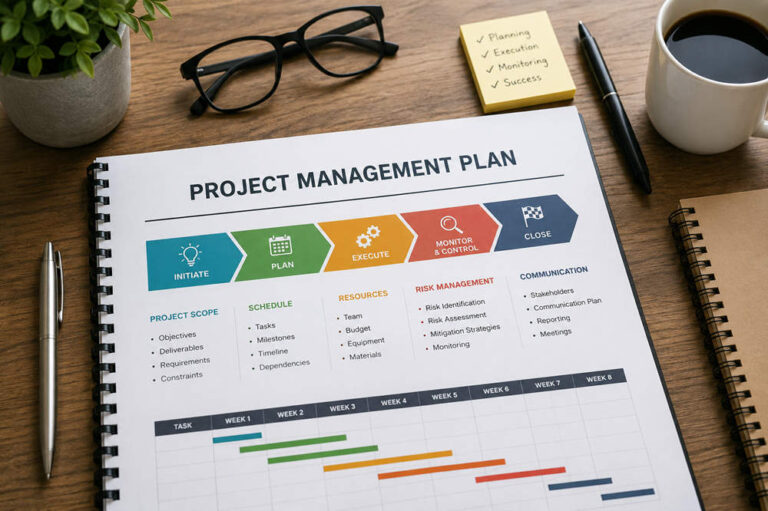
A Gantt chart is a project-management tool that places activities against a timeline.
Tasks or phases usually appear vertically, while horizontal bars show when each activity is expected to begin and end. A chart may also include:
- Task durations
- Milestones
- Dependencies
- Assigned team members
- Completion percentages
- Planned and actual dates
- Critical paths
Microsoft’s guide to the Gantt Chart view describes it as a list of project tasks accompanied by bars that illustrate their schedules and relationships. Linked activities can also be connected to show dependencies.
Used appropriately, this format makes complicated work easier to understand.
The chart itself is not the problem. Trouble begins when its clean appearance hides uncertain estimates, untested assumptions, or a level of detail that cannot be maintained realistically.
Why Gantt Charts Are So Attractive
Gantt charts satisfy several understandable management needs.
They turn complicated work into a visible structure. They help executives see important dates without reading hundreds of task descriptions. They make dependencies easier to discuss and provide a familiar format for client or stakeholder reporting.
They can offer:
- A high-level project overview
- Visibility into major milestones
- A way to coordinate several teams
- A shared view of important deadlines
- A record of the intended sequence of work
- A simple format for discussing schedule changes
These are genuine benefits.
However, the same visual clarity that makes a Gantt chart useful can make it misleading. A polished schedule looks authoritative even when the information behind it is incomplete.
A precise date generated by professional software may feel more reliable than a verbal estimate. But the appearance of precision does not improve the quality of the assumptions underneath it.
A Plan Is Not a Forecast
Organizations often confuse plans, forecasts, targets, and commitments.
A plan describes what the team currently intends to do.
A forecast estimates what is likely to happen based on the available evidence.
A target expresses the result or date the organization wants to achieve.
A commitment is a promise that should be made only when the team has reasonable confidence and control.
These concepts may influence one another, but they are not interchangeable.
A company may target a September product launch. The team may plan its work around that goal while forecasting that delivery is currently most likely between late September and mid-October.
Presenting the target date as though it were the evidence-based forecast does not make the work move faster. It only hides the gap between ambition and current reality.
A schedule may depend on assumptions about:
- Employee availability
- Approval times
- Technical difficulty
- Supplier performance
- Customer decisions
- Requirements remaining stable
- Estimates being reasonably accurate
- Competing work not consuming capacity
When those assumptions remain invisible, an exact date can communicate more certainty than the team possesses.
A responsible schedule should therefore be treated as a working forecast that can change as the evidence changes.
The False Precision of Exact Dates
Project software can calculate exact dates across hundreds of connected activities.
Imagine that one task is estimated at five days, a second at six days, and a final review at four days. Once the activities are linked, the software can produce a precise completion date.
The calculation may be mathematically correct.
The forecast is still only as reliable as the three estimates, the listed dependencies, the team’s availability, and the assumption that no new information will alter the work.
Calculated precision is not the same as reliable knowledge.
The Project Management Institute’s guidance on Gantt charts and agile planning warns that project tools can calculate exact dates and imply a level of planning precision that does not exist. It recommends communicating uncertain milestones as ranges when that better reflects reality.
Instead of claiming that a milestone will be reached on September 23, a team might forecast that it is likely to occur between mid-September and early October.
That answer may look less impressive on a presentation slide. It is also more honest and useful.
Greater precision should be earned through greater knowledge.
Excessive Detail Creates Administrative Work
A high-level Gantt chart can be relatively easy to update. A chart containing hundreds of small activities may become a project of its own.
Every significant change can require revisions to durations, owners, links, dates, progress percentages, and downstream dependencies.
The team may need to update the schedule when:
- An activity takes longer than estimated
- A priority changes
- A requirement is revised
- A new dependency is discovered
- Someone becomes unavailable
- Work is completed in a different order
- An activity is added or removed
- Customer feedback changes the direction
The more detailed the chart becomes, the more effort is required to keep it aligned with reality.
If the schedule is not maintained, it becomes misleading. If it is maintained constantly, it can consume time that might be better spent removing obstacles, clarifying decisions, or helping the team complete the work.
PMI recommends keeping agile Gantt charts high-level and using them primarily for important dates, activities, milestones, and dependencies. Detailed team activities are often better managed through task boards or other day-to-day systems.
A planning tool has become too heavy when maintaining the representation of the work consumes more effort than improving the work itself.
Rigid Plans Discourage Adaptation
Planning gives people direction. Blindly following an outdated plan creates waste.
Written specifically for software development, the Manifesto for Agile Software Development values responding to change over following a plan while recognizing that planning still has value. Its broader lesson applies to other uncertain projects as well: a plan should guide decisions without preventing adaptation.
A rigid planning culture encourages the opposite behavior.
Changes are treated as failures because they move the project away from its original baseline. Teams continue activities that no longer offer enough value because those activities remain on the schedule. Managers concentrate on explaining deviations rather than improving the result.
This can lead to unhealthy practices:
- Employees hide emerging problems.
- Teams resist useful requirement changes.
- Managers defend dates that are no longer realistic.
- Outdated activities continue because they were originally approved.
- Schedule compliance becomes more important than customer value.
- Reports are adjusted while the underlying problem remains unresolved.
A schedule should change when the team learns something important.
Updating a plan is not evidence of poor discipline. Refusing to update it after its assumptions have failed is evidence that the organization is ignoring reality.
Top-Down Scheduling Weakens Ownership
Gantt charts are sometimes created before the people performing the work have contributed meaningfully to the plan.
A manager divides the project into activities, assigns durations, creates dependencies, and then presents the finished schedule to the team.
That approach creates several risks:
- Estimates are made by people distant from the work.
- Technical dependencies are overlooked.
- Employees inherit dates they did not help establish.
- Team members are treated as resources assigned to bars.
- The schedule becomes a control document rather than a shared plan.
- People comply publicly while privately believing the dates are unrealistic.
Planning becomes stronger when it includes those closest to the work.
Scrum provides one example of this principle. In Scrum, Sprint Planning is collaborative, and the Developers decide how selected work will be turned into a usable result. The resulting plan is updated as the team learns more.
Every organization does not need to adopt Scrum. The wider lesson is that the people performing the work should help estimate effort, expose risks, identify dependencies, and decide how execution will be organized.
Leaders can still establish goals, budgets, boundaries, and critical deadlines. Participation does not remove leadership responsibility. It produces a plan based on better information.
Elapsed Time Is Not the Same as Progress
Gantt charts often display tasks as percentages complete.
That can be useful when progress is genuinely measurable. It becomes misleading when the percentage is based mainly on elapsed time.
If a 10-day activity has been underway for five days, it is not necessarily 50 percent complete.
Knowledge work rarely progresses in a smooth line. A team may spend several days investigating a difficult problem and then solve it quickly. It may appear almost finished before discovering that a major assumption was wrong.
Some tasks remain “90 percent complete” for weeks because the final portion contains the greatest uncertainty.
The Agile Manifesto’s principles identify working software as the primary measure of progress in software development. The broader lesson is that other projects should also define progress through completed, usable outcomes rather than time spent alone.
Depending on the project, useful evidence of progress might include:
- A tested feature
- An approved design
- A working prototype
- A resolved decision
- A validated assumption
- A completed customer outcome
- A usable deliverable
- A measurable reduction in risk
The important question is not merely, “How much scheduled time has passed?”
It is, “What now exists, works, or has been learned that did not exist before?”
When Gantt Charts Are Useful
Gantt charts should not be abandoned completely.
They remain valuable when teams need a high-level view of:
- Major project phases
- Important milestones
- External deadlines
- Dependencies between teams
- Supplier delivery dates
- Regulatory requirements
- Contractual commitments
- Broad release windows
- Construction or operational sequences
- Portfolio-level initiatives
They are particularly useful when activities must occur in a meaningful sequence and the work is reasonably predictable.
A construction project, for example, may depend on permits, material deliveries, inspections, and physical activities that must occur in a particular order.
A product launch may require coordination among development, legal, marketing, training, sales, and customer support.
PMI supports using Gantt charts in agile and lean environments when they summarize schedules, highlight important dates and dependencies, remain high-level, and evolve as circumstances change.
The mistake is not using a Gantt chart for these purposes. It is filling the chart with unnecessary detail or presenting every date as equally dependable.
When Another Tool Is Better
A detailed Gantt chart is less suitable as the main execution tool when:
- The team is exploring an unfamiliar problem.
- Requirements are expected to change frequently.
- Customer feedback will determine the direction.
- Activities cannot be estimated reliably in advance.
- Work emerges as learning occurs.
- The workflow is continuous rather than project-based.
- Priorities change more quickly than the chart can be updated.
- Daily work requires real-time coordination.
Experimental work often benefits from shorter planning cycles and tools that make reprioritization easier.
Depending on the work, alternatives may include:
- Product backlogs
- Kanban boards
- Short planning cycles
- Rolling forecasts
- Milestone roadmaps
- Risk registers
- Regular review sessions
These approaches do not eliminate uncertainty. They make it easier to respond without rebuilding a large, interconnected schedule every time something changes.
A team may also use both systems: a high-level Gantt chart for stakeholder communication and a task board for daily execution.
How to Use a Gantt Chart Responsibly
The solution is not necessarily to remove the chart. It is to use it with restraint and honesty.
Keep it high-level
Show major phases, releases, milestones, and critical dependencies.
Avoid adding every small task simply because the software allows it.
Expose the assumptions
Record the conditions that must remain true for the forecast to hold.
For example:
- Key specialists remain available.
- Customer approval arrives within five business days.
- No major requirement change occurs.
- The supplier meets its current delivery estimate.
When an assumption changes, review the schedule.
Separate targets from forecasts
A target communicates what the organization wants.
A forecast communicates what the current evidence suggests.
Leaders can set ambitious targets without pressuring teams to disguise them as dependable forecasts.
Involve the people doing the work
Let team members contribute estimates, identify dependencies, expose risks, and shape the execution plan.
Participation does not guarantee accuracy, but it creates a more informed schedule.
Update the chart when reality changes
A baseline can help explain what changed. It should not become a reason to preserve an obsolete plan.
The chart should evolve as new information emerges.
Combine strategic and operational tools
Use the Gantt chart for broad visibility.
Use a task board, backlog, or workflow system to coordinate daily activities.
No single tool needs to perform every planning, reporting, and management function.
Measure outcomes as well as deadlines
Schedule performance matters, but it is not the only measure of success.
Leaders should also examine:
- Customer value
- Quality
- Risk reduction
- Learning
- Business impact
- Employee workload
- Sustainability
A project delivered on time can still fail if it produces the wrong result.
Choosing the Right Planning Tool
| Use a Gantt chart for | Use another tool for |
|---|---|
| Major phases and milestones | Daily task coordination |
| External dependencies | Rapidly changing priorities |
| Broad release windows | Experimental work |
| Contractual deadlines | Continuous workflow |
| Cross-team sequencing | Detailed team execution |
| Executive communication | Real-time problem-solving |
The choice does not need to be permanent or exclusive.
Use each tool for the job it handles well.
Break the Addiction to Certainty
Organizations do not need to eliminate Gantt charts. They need to stop treating them as oracles.
A Gantt chart can communicate a current plan, important dependencies, and major milestones. It cannot guarantee estimates or remove uncertainty.
The strange addiction is not the visual timeline itself. It is the belief that adding more tasks, links, and exact dates makes the future more predictable.
Use the chart to make the plan visible—not to pretend that the plan is certain.
Plan seriously, expose assumptions, involve the people doing the work, measure real outcomes, and revise the schedule whenever better information becomes available.