Enterprise Collaboration Software: What It Is and Popular Platforms to Consider
Enterprise collaboration software gives employees a shared digital space where they can communicate, exchange files, manage work, and access company information.
Large organizations often have teams spread across different departments, offices, and time zones. Without a central system, conversations may be buried in email, files may be stored in separate folders, and employees may struggle to find the latest project information.
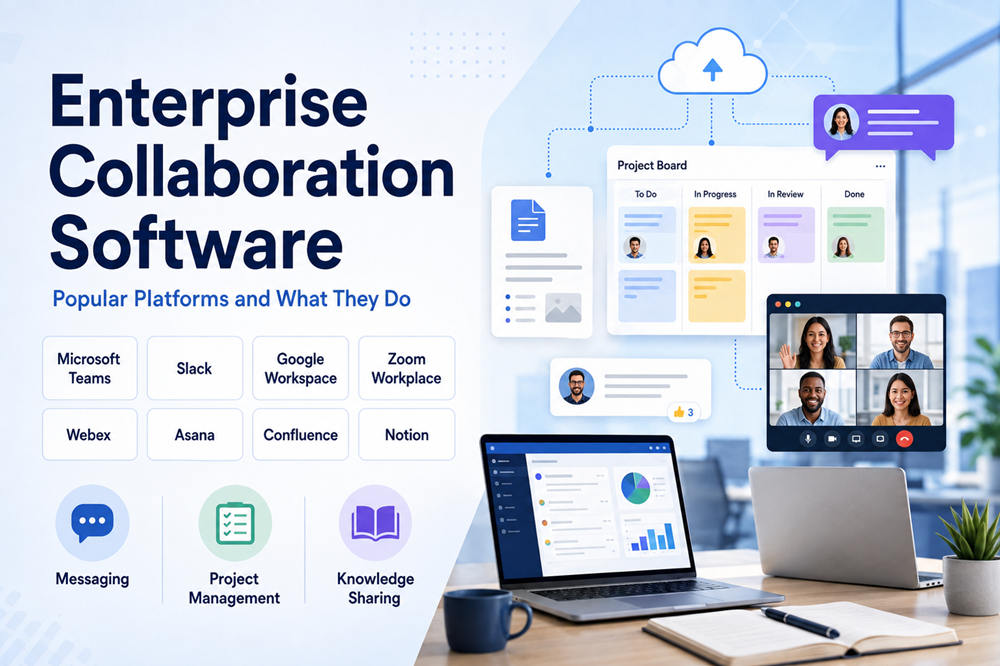
Enterprise collaboration software brings these activities together. Depending on the platform, employees may use it for messaging, video meetings, document editing, project tracking, knowledge sharing, or all of these tasks.
What Is Enterprise Collaboration Software?
Enterprise collaboration software is workplace technology designed to help large groups of employees work together.
It normally supports more users and provides stronger administrative controls than a basic messaging or video-call app. IT teams can manage accounts, permissions, integrations, security policies, guest access, and company data from a central location.
Common features include:
- Direct messages and team channels
- Video meetings and business calls
- File sharing
- Real-time document editing
- Task and project management
- Internal knowledge bases
- Company announcements
- Search across files and conversations
- Workflow automation
- Security and compliance controls
Not every platform includes all these features. Some focus mainly on communication, while others specialize in project management or knowledge sharing.
A company may also use more than one platform. For example, employees could use Microsoft Teams for meetings, Asana for projects, and Confluence for company documentation.
Why Companies Use Collaboration Software
The purpose of enterprise collaboration software is not simply to replace email. It gives employees a clearer way to organize conversations, work, and information.
A project team might use a shared channel to discuss an upcoming product launch. Team members can upload files, assign tasks, hold meetings, and record important decisions in the same connected workspace.
This can help a company:
- Keep employees informed
- Reduce long email chains
- Support remote and hybrid work
- Make documents easier to find
- Track project responsibilities
- Preserve company knowledge
- Connect departments
- Standardize common processes
- Control access to sensitive information
The software is most helpful when a company creates clear rules for how it should be used. Employees need to know where final documents belong, which conversations should happen in public channels, and where important decisions are recorded.
Popular Enterprise Collaboration Software Examples
The following platforms are well-known examples of enterprise collaboration software. They serve different purposes, so the best choice depends on how a company works.
1. Microsoft Teams
Microsoft Teams is a communication and collaboration platform commonly used by organizations that already rely on Microsoft products.
It combines:
- Team messaging
- Video meetings
- Business calls
- File sharing
- Shared channels
- Tasks and polls
- Meeting recordings and transcripts
- Calendar integration
Teams connects closely with Microsoft 365 applications such as Word, Excel, PowerPoint, Outlook, OneDrive, SharePoint, and Planner. Employees can discuss a project, open a shared document, and edit it together without leaving the Microsoft environment.
Teams is generally a strong fit for organizations already using Microsoft 365 and wanting communication, meetings, documents, and administration within one connected system.
2. Slack
Slack is centered on channel-based communication. Teams can create channels for departments, projects, customers, incidents, or specific topics.
Its main features include:
- Public and private channels
- Direct messages
- Audio and video conversations
- File sharing
- Searchable message history
- Workflow automation
- Application integrations
- Enterprise search
- Administrative and security controls
Slack can connect with tools such as Google Drive, Salesforce, Microsoft applications, project management software, and development platforms. Its enterprise plans also include features for identity management, user provisioning, data protection, and compliance.
Slack may suit companies that rely heavily on quick conversations, cross-team channels, software integrations, and flexible workflows.
3. Google Workspace
Google Workspace is a collection of cloud-based communication and productivity applications.
It includes:
- Gmail
- Google Chat
- Google Meet
- Google Calendar
- Google Drive
- Google Docs
- Google Sheets
- Google Slides
- Google Forms
- Google Sites
One of its main strengths is real-time document collaboration. Several employees can work on the same document, spreadsheet, or presentation while adding comments and viewing changes as they happen.
Files are stored in Google Drive, allowing approved users to access the latest version without sending email attachments back and forth. Google Workspace also provides centralized administration, two-step verification, single sign-on, endpoint management, and information-retention tools.
It is often a practical choice for companies that want browser-based email, meetings, cloud storage, and document editing in one suite.
4. Zoom Workplace
Zoom Workplace expands Zoom beyond video conferencing into a broader workplace collaboration platform.
Depending on the plan, its tools may include:
- Video meetings
- Team chat
- Business phone service
- Shared documents
- Notes
- Tasks
- Digital whiteboards
- Video messages
- Meeting summaries
- Appointment scheduling
Employees can continue conversations through Zoom Chat before and after a meeting. They can also share notes, whiteboards, files, and other resources connected to the discussion.
Zoom Workplace supports integrations with Microsoft, Google, and other business applications.
It may be a suitable option for organizations that depend heavily on virtual meetings but also want messaging, phone, notes, and other collaboration tools in the same environment.
5. Cisco Webex
Cisco Webex is an enterprise communication suite built around meetings, messaging, calling, and workplace devices.
Its collaboration tools include:
- Video meetings
- Team messaging
- Business calling
- Webinars
- Online events
- Digital whiteboards
- Polls
- Video messages
- File sharing
Webex also provides centralized management for users, devices, security settings, and workplace technology. This can be useful for large organizations that operate conference rooms, business phone systems, and hybrid meeting spaces.
It is often considered by organizations that need a combination of online collaboration, enterprise calling, meeting-room equipment, and centralized IT control.
6. Asana
Asana is primarily a work and project management platform rather than a general messaging system.
Teams use it to:
- Create and assign tasks
- Set deadlines
- Plan projects
- Build workflows
- Track company goals
- Monitor workloads
- Request approvals
- Automate routine processes
- Report on project progress
Asana helps connect company goals with the projects and tasks employees complete each day. Enterprise features include administrative controls, permissions, audit logs, identity management, guest restrictions, and security integrations.
It can work well for organizations that need more structure around responsibilities, deadlines, project visibility, and cross-department workflows.
7. Confluence
Confluence is a knowledge and content collaboration platform from Atlassian.
Companies can use it to create:
- Internal knowledge bases
- Company policies
- Project documentation
- Meeting notes
- Training guides
- Process instructions
- Team pages
- Product requirements
Employees can create shared pages, leave comments, mention coworkers, organize content into spaces, and search across company information.
Confluence Enterprise adds features for centralized administration, multiple company sites, analytics, access management, security, and compliance.
It is especially useful for organizations that need a reliable place to store knowledge that should remain available after a chat conversation or project ends.
8. Notion
Notion combines knowledge management, documents, project tracking, and lightweight databases in a flexible workspace.
Teams may use it for:
- Company wikis
- Project plans
- Meeting notes
- Task lists
- Product roadmaps
- Employee onboarding
- Internal databases
- Shared documents
- Workflow automation
Notion also offers enterprise search across its workspace and connected applications. Its enterprise controls include single sign-on, user provisioning, domain management, auditing, compliance tools, and workspace administration.
It may suit organizations that want to create customizable workspaces rather than follow a fixed project or document structure.
Comparing the Main Types of Collaboration Software
These platforms overlap, but they do not serve exactly the same purpose.
For messaging and team conversations:
Microsoft Teams and Slack are two of the most recognizable options.
For meetings and business calling:
Microsoft Teams, Zoom Workplace, and Cisco Webex provide strong communication features.
For cloud documents and email:
Google Workspace and Microsoft 365 offer connected productivity suites.
For project and task management:
Asana focuses more deeply on assignments, timelines, workflows, and goals.
For knowledge management:
Confluence and Notion help companies organize policies, instructions, project notes, and internal information.
A company does not always need one platform to perform every function. In some cases, choosing specialized tools and connecting them through integrations may work better than forcing all teams into one system.
Features to Look For
Before selecting enterprise collaboration software, consider which features employees will use every day.
Communication Tools
Look at the platform’s messaging, meetings, calling, announcements, and guest communication options.
File and Knowledge Management
Employees should be able to find current documents without searching through personal folders or old email attachments.
Search
Search should cover messages, files, projects, people, and company knowledge. A platform becomes less useful when employees know information exists but cannot locate it.
Integrations
The software should connect with the company’s existing email, calendar, storage, customer management, HR, finance, and project systems.
Security
Important controls may include:
- Single sign-on
- Multi-factor authentication
- Role-based permissions
- Encryption
- Audit logs
- Data retention policies
- Guest access controls
- Data loss prevention
- User provisioning
- Device management
Administration
IT teams should be able to add and remove users, manage permissions, review activity, control external applications, and apply policies from a central console.
Ease of Use
A platform with hundreds of features is not helpful if employees find it confusing. The system should fit naturally into daily work and require as little unnecessary switching between applications as possible.
How to Choose the Right Platform
Start by identifying the problem the company needs to solve.
A business struggling with scattered conversations may need Slack or Microsoft Teams. A company with disorganized projects may benefit more from Asana. An organization that cannot find its policies and internal knowledge may need Confluence or Notion.
Ask these questions before making a decision:
- Which tools do employees already use?
- What information is currently difficult to find?
- Does the company need better messaging, meetings, project tracking, or documentation?
- How many employees and external guests need access?
- Which security and compliance requirements apply?
- Can the platform connect with existing business systems?
- How difficult will it be to migrate current files and data?
- Can administrators manage the platform at scale?
- What will the complete cost be after adding storage, integrations, and advanced features?
- Will employees actually use it?
Testing the software with a small group can reveal problems before a company-wide rollout. A pilot gives employees and IT teams an opportunity to test workflows, integrations, permissions, and training materials.
Final Thoughts
Enterprise collaboration software helps companies connect people, conversations, documents, projects, and knowledge.
Microsoft Teams, Slack, Google Workspace, Zoom Workplace, Cisco Webex, Asana, Confluence, and Notion are all well-known examples, but they focus on different parts of collaboration.
The best platform is not automatically the one with the longest feature list. It is the one that solves the company’s main collaboration problems, works with its existing technology, protects its information, and is simple enough for employees to use consistently.