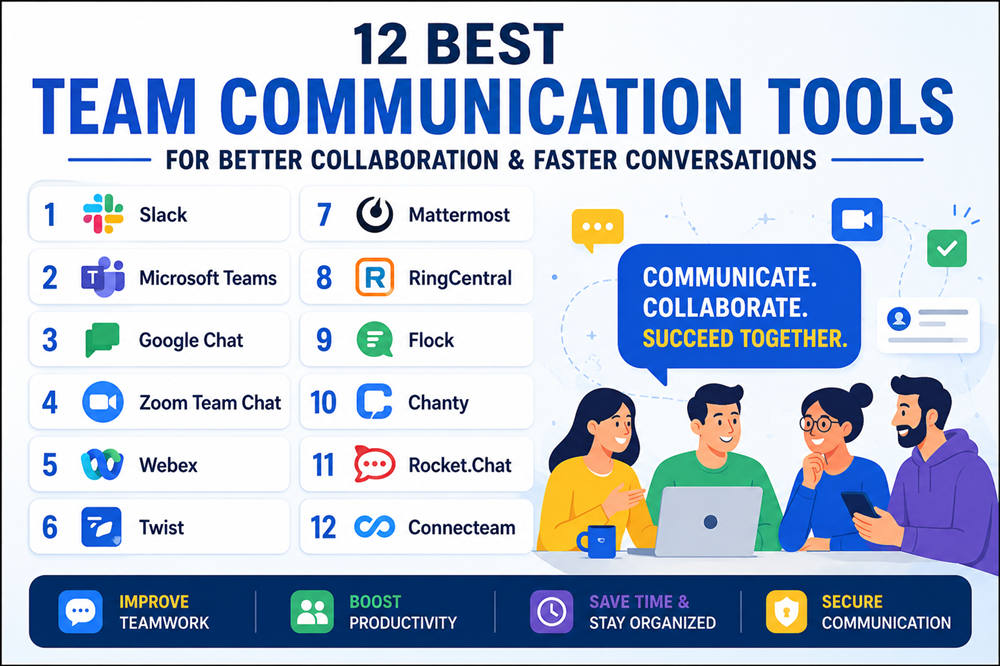
12 Best Team Communication Tools for Better Collaboration and Faster Workplace Conversations
The right team communication tools can make it easier to share updates, solve problems, make decisions, and keep projects moving. This matters even more when employees work remotely, follow hybrid schedules, or rarely sit in the same location.
There is no single best platform for every workplace. Some teams need fast chat, others depend on video meetings, and frontline businesses may need mobile-first communication. The tools below cover those different needs.
1. Slack
Slack is built around organized workplace messaging. Instead of putting every conversation into one group chat, you can create separate channels for projects, departments, clients, announcements, or specific topics.
Its biggest strength is how easily it connects with other workplace software. Teams that use tools for project management, development, customer support, calendars, or file storage can often bring notifications and actions directly into Slack.
Slack also includes direct messages, threads, audio and video Huddles, file sharing, and search.
For teams that communicate throughout the day, its channel structure can make conversations easier to find than traditional email threads.
Best for: Remote teams, startups, agencies, software companies, and workplaces that rely heavily on real-time messaging.
2. Microsoft Teams
Microsoft Teams is particularly useful if your organization already works with Microsoft 365.
Employees can chat, hold meetings, share files, collaborate on documents, and organize conversations by team or channel. Microsoft Word, Excel, PowerPoint, Outlook, OneDrive, and SharePoint also fit naturally into the same ecosystem.
That integration is the main reason to choose Teams over a separate messaging platform. A company already using Microsoft tools may find it easier to keep communication and documents under one system rather than adding another service.
Teams also works well for larger organizations that need structured communication across many departments.
Best for: Microsoft 365 users, corporations, schools, hybrid workplaces, and larger organizations.
3. Google Chat
Google Chat is a straightforward communication option for organizations using Google Workspace.
You can have direct conversations or create Spaces for teams, departments, and projects. Because Chat works closely with Gmail, Google Drive, Docs, Sheets, Meet, and other Workspace services, employees can discuss work without leaving the Google environment they already use.
Its biggest advantage is simplicity rather than an enormous list of features.
If your organization already manages email, documents, calendars, meetings, and storage through Google Workspace, Google Chat can provide workplace messaging without requiring employees to learn another complicated platform.
Best for: Google Workspace users, small businesses, schools, nonprofits, and teams that want simple workplace messaging.
4. Zoom Team Chat
Zoom Team Chat brings everyday messaging into the same platform many businesses already use for virtual meetings.
Employees can move between conversations and meetings without switching between completely separate communication systems. That can be useful when a quick text discussion becomes something that is easier to resolve face-to-face.
It is especially practical for organizations that already spend a large part of their working day in Zoom.
A company using Zoom heavily for client calls, internal meetings, training, and webinars may find Team Chat more convenient than introducing another workplace messenger.
Best for: Hybrid teams, distributed businesses, client-facing teams, and companies already using Zoom extensively.
5. Webex
Webex is designed for businesses that need messaging, meetings, and calling within a broader communications platform.
Rather than focusing mainly on workplace chat, Webex works well when employees regularly move between messages, video conferences, and business calls.
Teams can create spaces for projects and departments, send direct messages, share files, and start meetings when a written discussion requires more attention.
Its unified approach makes Webex particularly attractive to larger businesses that would rather manage several forms of employee communication through one provider.
Best for: Large organizations, corporate teams, hybrid workplaces, and businesses with frequent meetings and calls.
6. Twist
Twist is different from platforms built around rapid, continuous workplace chat.
Its focus is asynchronous communication.
Instead of expecting employees to monitor conversations throughout the day, Twist organizes discussions into threads that people can read and answer when their schedules allow.
That approach can reduce pressure to respond immediately and make important discussions easier to revisit later.
It is especially useful for distributed teams working across several time zones. Someone in New York can leave a detailed update that a coworker in Europe or Asia can review without needing everyone online simultaneously.
Best for: Remote companies, distributed teams, asynchronous workplaces, and people who want fewer chat interruptions.
7. Mattermost
Mattermost is aimed at organizations that need more control over their communication infrastructure.
It provides channel-based messaging and collaboration, but its biggest advantage is the ability to support environments where security, deployment options, and organizational control are major concerns.
That makes Mattermost particularly relevant for technical teams and organizations that cannot simply place all internal communication on a standard public cloud service.
Development and IT teams may also appreciate its integrations and workflows built around technical operations.
For an ordinary small business, Mattermost may offer more control than necessary. For organizations with strict infrastructure requirements, however, that control can be exactly the point.
Best for: Developers, IT departments, security-focused businesses, government organizations, and technical teams.
8. RingCentral
RingCentral makes sense for businesses where phone communication remains just as important as workplace messaging.
The platform brings business calling, team messages, and video meetings together instead of treating them as completely separate systems.
This can be especially useful for sales departments, customer service operations, and organizations whose employees regularly communicate with both coworkers and customers by phone.
Rather than choosing RingCentral purely as a chat application, businesses typically benefit most when they want a broader communication system that includes calling.
Best for: Sales organizations, customer-facing businesses, call-heavy workplaces, and companies wanting messaging and business phones together.
9. Flock
Flock offers a familiar channel-based approach to workplace communication.
Teams can separate discussions by project or department, send direct messages, share files, make calls, and use screen sharing when something is easier to demonstrate visually.
Its straightforward interface can appeal to smaller organizations that want common collaboration features without building an especially complex communication system.
Flock competes most directly with general workplace messaging platforms, so its value depends largely on whether its interface, pricing, and available integrations match your team’s workflow.
Best for: Small businesses, startups, growing companies, and teams looking for straightforward workplace messaging.
10. Chanty
Chanty combines workplace chat with basic task management.
That combination is useful because many workplace tasks begin inside conversations. A manager might ask someone to update a document, contact a customer, or complete a report. In a normal group chat, that request can quickly disappear beneath newer messages.
Chanty allows teams to connect communication more closely with actionable work, including task organization and Kanban-style views.
It will not replace a full project management platform for every business, but smaller teams may appreciate having conversations and simple tasks together.
Best for: Small teams, startups, and workplaces that want messaging with lightweight task management.
11. Rocket.Chat
Rocket.Chat is another communication platform built for organizations that want greater control over where and how workplace conversations are managed.
Its open-source foundation and deployment options make it particularly attractive to technical, government, and regulated organizations.
Teams can still use familiar communication features such as channels, direct conversations, file sharing, and group discussions, but Rocket.Chat’s bigger selling point is control rather than simply providing another workplace messenger.
Organizations with strict privacy, compliance, or infrastructure requirements may find that flexibility more valuable than the convenience of a standard cloud-only chat service.
Best for: Government organizations, regulated industries, technical teams, and businesses with specialized privacy requirements.
12. Connecteam
Connecteam stands out because it is designed largely for employees who do not spend their day sitting at a desk.
Managers can communicate with workers through mobile chat, company updates, announcements, surveys, events, directories, and shared information.
That makes it particularly useful for industries where employees work in stores, restaurants, construction sites, warehouses, customer homes, or other locations away from a traditional office.
A restaurant chain, for example, may need to reach hundreds of employees who do not have corporate email accounts or laptops. A mobile-first communication platform can be much more practical in that environment.
Best for: Frontline employees, field workers, restaurants, retail businesses, construction companies, and other deskless teams.
How to Choose a Team Communication Tool
The platform with the longest feature list is not automatically the best choice. What matters is whether the tool fits how your team actually communicates.
Consider Your Existing Software
Start with the tools your employees already use.
If your company runs almost entirely on Microsoft 365, Microsoft Teams may be the easiest option. A Google Workspace business may get everything it needs from Google Chat, while an organization already running most meetings through Zoom might prefer Zoom Team Chat.
Choosing a platform that fits your existing software can reduce training and unnecessary app switching.
Decide Whether You Need Real-Time or Asynchronous Communication
Not every workplace needs constant chat.
Teams that work closely together during the same hours may benefit from Slack-style real-time messaging.
Distributed teams across different time zones may prefer a platform such as Twist, where conversations are designed to be read and answered later.
The right choice depends on whether fast responses are essential or whether employees need more uninterrupted work time.
Think About Where Employees Work
Office workers and frontline workers communicate differently.
Employees sitting at computers throughout the day can easily use platforms such as Slack, Teams, or Google Chat.
Retail workers, restaurant employees, drivers, construction crews, and field teams may need a stronger mobile-first experience. Connecteam is designed more directly around that type of workforce.
Choose a tool employees can realistically access during their working day.
Check Your Meeting and Calling Needs
If messaging is your main priority, a dedicated team chat platform may be enough.
If your employees also make frequent business calls or participate in video meetings, consider a platform that combines those functions.
Webex and RingCentral can make more sense when calling is central to your workflow, while Zoom Team Chat is worth considering when virtual meetings dominate internal communication.
Look at Integrations
Communication tools rarely operate alone.
Your team may also use project management platforms, calendars, cloud storage, customer relationship management software, development tools, or help-desk systems.
Check whether the communication platform connects with the applications your employees depend on every day.
Strong integrations can prevent employees from constantly switching between applications just to check basic updates.
Consider Security and Control
Most businesses can use mainstream cloud communication platforms without needing specialized deployment options.
Some organizations cannot.
Government departments, regulated industries, security teams, and companies handling sensitive information may require greater control over infrastructure and data.
Mattermost and Rocket.Chat are worth examining when those requirements are more important than simply finding the easiest workplace messenger.
Keep It Simple
A communication tool should reduce friction, not create another layer of work.
Avoid choosing a complicated platform simply because it offers hundreds of features. If employees only need reliable messages, organized conversations, and occasional calls, a simpler solution may produce better results.
The best team communication tool is usually the one your employees can understand quickly and will actually use consistently.